

Adding delivery to a sale across platforms
On Desktop Web (Browser)
- Build your customer’s cart in New sale as usual, then click Continue to Payment.
- In the Delivery card, toggle on Include delivery.
- Type the Delivery address and the quoted Uber/vendor fee.
- Choose Who pays the vendor fee?:
- Charge customer: Adds the courier fee (and any applicable delivery tax) onto the customer’s cart total.
- Business absorbs: Your store covers the delivery fee as an operational expense; the customer pays only for their merchandise.
- Review the updated total, choose the customer’s payment method, and click Complete Sale.
On iPhone (Native iOS App)
- On the POS screen, build the cart and tap Checkout to open the native checkout sheet.
- Toggle on the Delivery switch.
- Enter the drop-off destination address and courier fee.
- Toggle Charge Customer on or off. The checkout sheet recalculates tax and total in real time.
- Tap Complete Sale to save the order and spawn the active delivery task.
On Android & Mobile Web
- Open the cart in Register and tap Checkout.
- Check the Delivery Order box to reveal the address and courier fee fields.
- Confirm whether the customer is covering the runner fee, select payment tender, and complete the order.
Managing your delivery board (Deliveries)
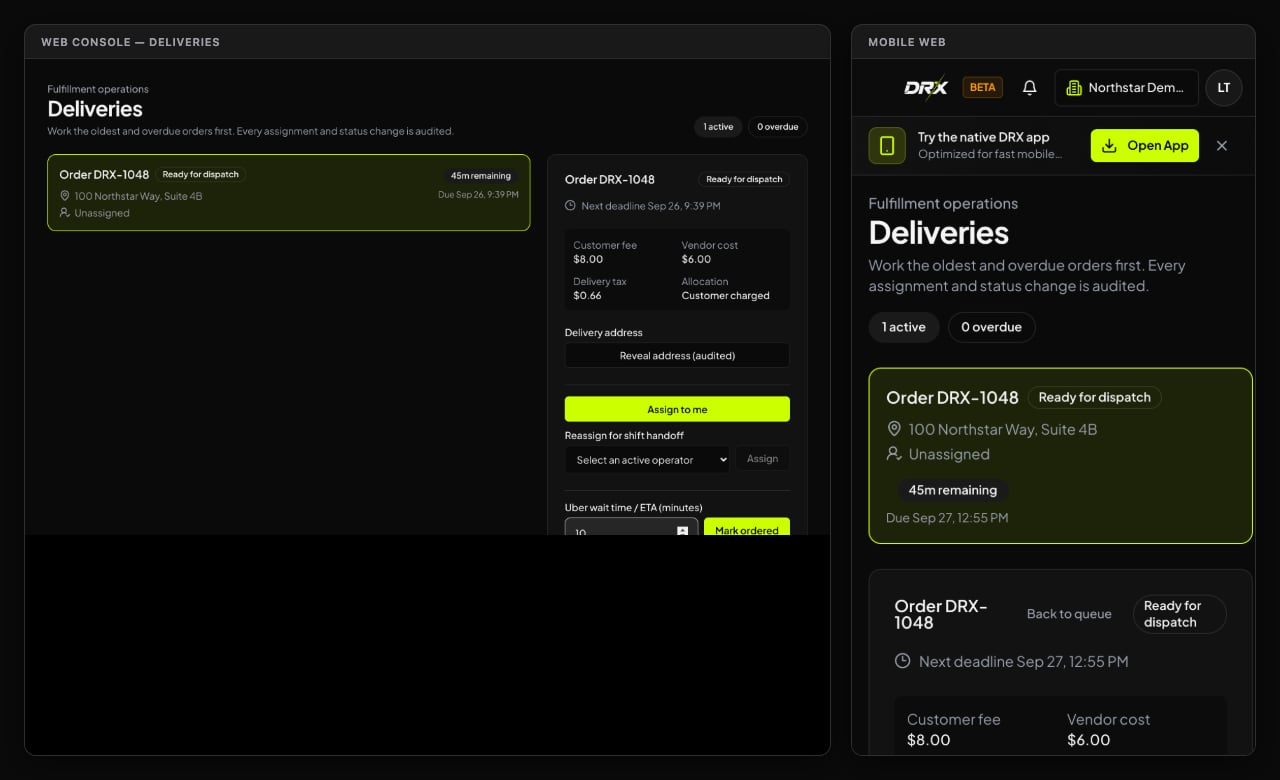
Once an order with delivery is saved, it automatically lands in your store’s Deliveries board:
- Assigning the Runner:
- Click or tap Deliveries to see all active orders.
- A driver or manager can tap Assign to me to take ownership of the drop-off.
- For privacy, the customer’s street address is masked on the main board. The driver taps Reveal address (audited) to view the destination when packing up.
- Dispatch Milestones:
- Tap Mark ordered once the courier or driver is dispatched.
- Tap Mark handed off when the bag leaves the counter.
- Tap Mark delivered when the customer confirms receipt.
- Cancellations & Adjustments:
- If a customer calls and cancels while the driver is still at the shop, an authorized manager can cancel the delivery task. Canceling the drop-off does not delete the sale; handle any needed refund or credit through normal register procedures.